Tools

Utility tools for MSW Dev Tool.
Reset Dev tool
Button to reset the Dev Tool to its initial runtime state.
- Set HTTP and WebSocket behaviors to default
- Enable global and per-item HTTP/WebSocket mocking
- Remove temporary HTTP handlers, WebSocket endpoints, and listeners
- Close active mocked WebSocket connections
Add Temp Handler
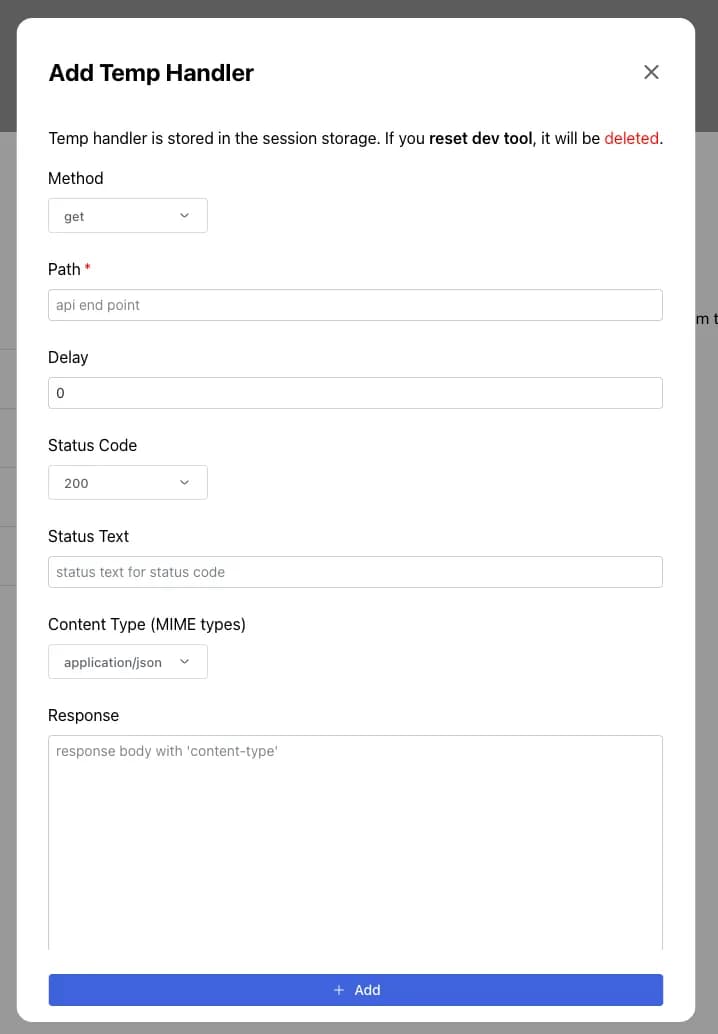
Dialog to add a temporary handler stored in the browser’s session storage.
Field
You can add the following fields to the temporary handler.
| Field | Description | Validation |
|---|---|---|
| Method | HTTP method, Default: GET | Optional |
| Path to mock | Required | |
| Delay | Delay time in milliseconds, Default: 0 | Minimum 0 milliseconds |
| Status | One of the supported HTTP status codes, Default: 200 | Supported codes only |
| Status Text | Status message for status code | Optional |
| Content Type | MIME type of response body, Default: JSON | One of the supported MIME types |
| Response Body | Response body | Appropriate to Content Type |
| Header | Response header | JSON format |
Last updated on